Akrolitycs
  • Home
  • ABOUT
  • SERVICES
  • CONTACT
  • Apps

Ops Bundle – Privacy Policy

Uncategorised

Akrolitycs Ops Bundle · Privacy Policy
English first · Versione italiana più in basso ↓

ENGLISH

Last updated: October 2026

This Privacy Policy applies to the iOS app Akrolitycs Ops Bundle (formerly Shift Certification), developed by Akrolitycs LLC ("we", "us").

1. No personal data collected by us

The app does not require an account and does not collect, transmit or sell personal data. It contains no analytics, advertising or tracking tools. Everything you enter (certifications, checklists, notes, photos, dates, contacts, settings and the PIN) is stored only on your device.

2. Files and iCloud Drive

PDF reports are saved in the app's folder on the device (Files → On My iPad/iPhone) and, if iCloud Drive is turned on, in the app's folder in your own iCloud Drive. These copies are kept by Apple under your Apple account: we have no access to them. You can turn iCloud Drive off for the app in Settings → your name → iCloud.

3. Device permissions

  • Camera: to scan the QR labels of the Control Tour and to take photos for notes.
  • Photo library: to attach existing photos to notes.
  • Notifications and alarms: Control Tour reminders are scheduled locally on the device.

Permissions are used only on the device and can be withdrawn at any time in Settings.

4. Purchases

The app is free and has no in-app purchases.

5. Deleting your data

Deleting the app permanently removes its data from the device. Copies saved in iCloud Drive can be deleted from the Files app.

6. Children

The app is a business tool and is not directed to children.

7. Contact

Akrolitycs LLC, Shams Business Center, Sharjah Media City Free Zone, United Arab Emirates · This email address is being protected from spambots. You need JavaScript enabled to view it.. If you write to us, we use your email address and message only to answer you.


ITALIANO

Ultimo aggiornamento: ottobre 2026

La presente informativa vale per l'app iOS Akrolitycs Ops Bundle (in precedenza Shift Certification), sviluppata da Akrolitycs LLC ("noi").

1. Nessun dato personale raccolto da noi

L'app non richiede un account e non raccoglie, trasmette né vende dati personali. Non contiene strumenti di analisi, pubblicità o tracciamento. Tutto ciò che inserisci (certificazioni, checklist, note, foto, date, contatti, impostazioni e PIN) resta solo sul tuo dispositivo.

2. File e iCloud Drive

I rapporti PDF vengono salvati nella cartella dell'app sul dispositivo (File → Sul mio iPad/iPhone) e, se iCloud Drive è attivo, nella cartella dell'app nel tuo iCloud Drive. Queste copie sono custodite da Apple nel tuo account Apple: noi non vi abbiamo accesso. Puoi disattivare iCloud Drive per l'app in Impostazioni → il tuo nome → iCloud.

3. Permessi del dispositivo

  • Fotocamera: per scansionare le etichette QR del Control Tour e scattare foto per le note.
  • Libreria foto: per allegare foto esistenti alle note.
  • Notifiche e allarmi: i promemoria del Control Tour sono programmati localmente sul dispositivo.

I permessi sono usati solo sul dispositivo e puoi revocarli in qualsiasi momento nelle Impostazioni.

4. Acquisti

L'app è gratuita e non ha acquisti in-app.

5. Cancellazione dei dati

Cancellando l'app i suoi dati vengono eliminati definitivamente dal dispositivo. Le copie salvate in iCloud Drive si possono eliminare dall'app File.

6. Minori

L'app è uno strumento di lavoro e non è rivolta ai minori.

7. Contatti

Akrolitycs LLC, Shams Business Center, Sharjah Media City Free Zone, Emirati Arabi Uniti · This email address is being protected from spambots. You need JavaScript enabled to view it.. Se ci scrivi, usiamo il tuo indirizzo e-mail e il messaggio solo per risponderti.

Ops Bundle – Support

Uncategorised

Akrolitycs Ops Bundle · support & FAQ
English first · Versione italiana più in basso ↓

ENGLISH

The app

Akrolitycs Ops Bundle brings the restaurant's everyday work tools together in one app for iPad and iPhone. It is an internal tool for the restaurant team, free of charge, with no account and no in-app purchases.

🎓 Trainer Certification
Assess the Crew Trainer point by point with Yes, No or N/A; section scores and the total update as you go.

✅ Shift Manager Certification
Pre Rush, Rush and Post Rush checklists for opening and closing, with notes, photos and a results overview.

🛠️ Restaurant Annual Certification & Check
The restaurant's periodic inspections with last-check dates, contractor contacts and deadline reminders.

🚶 Control Tour
Scheduled control rounds: scan the QR label of each zone, get reminders at set times and save the daily summary as a PDF. Printing the QR labels requires the settings PIN.

Frequently asked questions

Where is my data stored?

On your device. Nothing is uploaded to our servers. Deleting the app permanently deletes its data. PDF reports are also saved in the app's folder in the Files app and, if iCloud Drive is on, in your own iCloud Drive.

I updated from Shift Certification. Where is my certification?

Open the app: a certification in progress from Shift Certification is carried over automatically on first launch and the Shift Manager Certification module opens directly.

How do I share a report?

In each module tap Generate PDF (or Day summary (PDF) in the Control Tour) and choose where to save or send it.

I forgot the Control Tour PIN

The PIN is chosen on first use and stored only on the device, so we cannot recover it. The only way to choose a new one is to delete and reinstall the app, which also deletes the data on that device: save your PDF reports first.

Reminders or alarms do not ring

Check Settings → Notifications → Ops Bundle and make sure notifications are allowed. Keep the device volume up ("Ringtone and Alerts") and, on iOS 26 or later, allow alarms when the app asks. Reminders are scheduled locally on the device.

Contact us

Write to This email address is being protected from spambots. You need JavaScript enabled to view it. — we reply within 2 business days. Please include the app name, your iOS version and, if possible, a screenshot.

Privacy Policy · Terms of Service


ITALIANO

L'app

Akrolitycs Ops Bundle riunisce in un'unica app gli strumenti di lavoro quotidiano del ristorante, per iPad e iPhone. È uno strumento interno per il team del ristorante, gratuito, senza account e senza acquisti in-app.

🎓 Trainer Certification
Valuta il Crew Trainer punto per punto con Sì, No o N/A; i punteggi di sezione e il totale si aggiornano mentre compili.

✅ Shift Manager Certification
Checklist Pre Rush, Rush e Post Rush per apertura e chiusura, con note, foto e panoramica dei risultati.

🛠️ Restaurant Annual Certification & Check
Le verifiche periodiche del ristorante con data dell'ultimo controllo, contatto della ditta e promemoria delle scadenze.

🚶 Control Tour
Giri di controllo a orari fissi: scansiona l'etichetta QR di ogni zona, ricevi i promemoria e salva il riepilogo della giornata in PDF. La stampa delle etichette QR richiede il PIN impostazioni.

Domande frequenti

Dove sono salvati i miei dati?

Sul tuo dispositivo. Niente viene caricato sui nostri server. Cancellando l'app i dati vengono eliminati definitivamente. I rapporti PDF vengono salvati anche nella cartella dell'app nell'app File e, se iCloud Drive è attivo, nel tuo iCloud Drive.

Ho aggiornato da Shift Certification. Dov'è la mia certificazione?

Apri l'app: la certificazione in corso della Shift Certification viene recuperata automaticamente alla prima apertura e si apre direttamente il modulo Shift Manager Certification.

Come condivido un rapporto?

In ogni modulo tocca Genera PDF (o Riepilogo giornata (PDF) nel Control Tour) e scegli dove salvarlo o inviarlo.

Ho dimenticato il PIN del Control Tour

Il PIN si sceglie al primo utilizzo ed è salvato solo sul dispositivo, quindi non possiamo recuperarlo. L'unico modo per sceglierne uno nuovo è cancellare e reinstallare l'app, il che cancella anche i dati su quel dispositivo: salva prima i rapporti PDF.

Promemoria o allarmi non suonano

Controlla Impostazioni → Notifiche → Ops Bundle e verifica che le notifiche siano consentite. Tieni alto il volume del dispositivo ("Suoneria e avvisi") e, su iOS 26 o successivi, consenti gli allarmi quando l'app lo chiede. I promemoria sono programmati localmente sul dispositivo.

Contattaci

Scrivi a This email address is being protected from spambots. You need JavaScript enabled to view it. — rispondiamo entro 2 giorni lavorativi. Indica il nome dell'app, la versione di iOS e, se possibile, allega uno screenshot.

Privacy Policy · Termini di servizio

AkroPower

Uncategorised

Akrolitycs LLC · English first · Versione italiana più in basso ↓

ENGLISH

AkroPower — switch on only what you need, when you need it

The switch-on plan for restaurant kitchens. Set the times once; every day the app tells the team when to switch each piece of equipment on and off.

+52%
price of 1 kWh in 2024 compared with 2022
+25%
still in 2027, after the decreases
5–10%
our operational estimate of electricity saved
0 CHF
to start: free download

Electricity got expensive — and stayed expensive

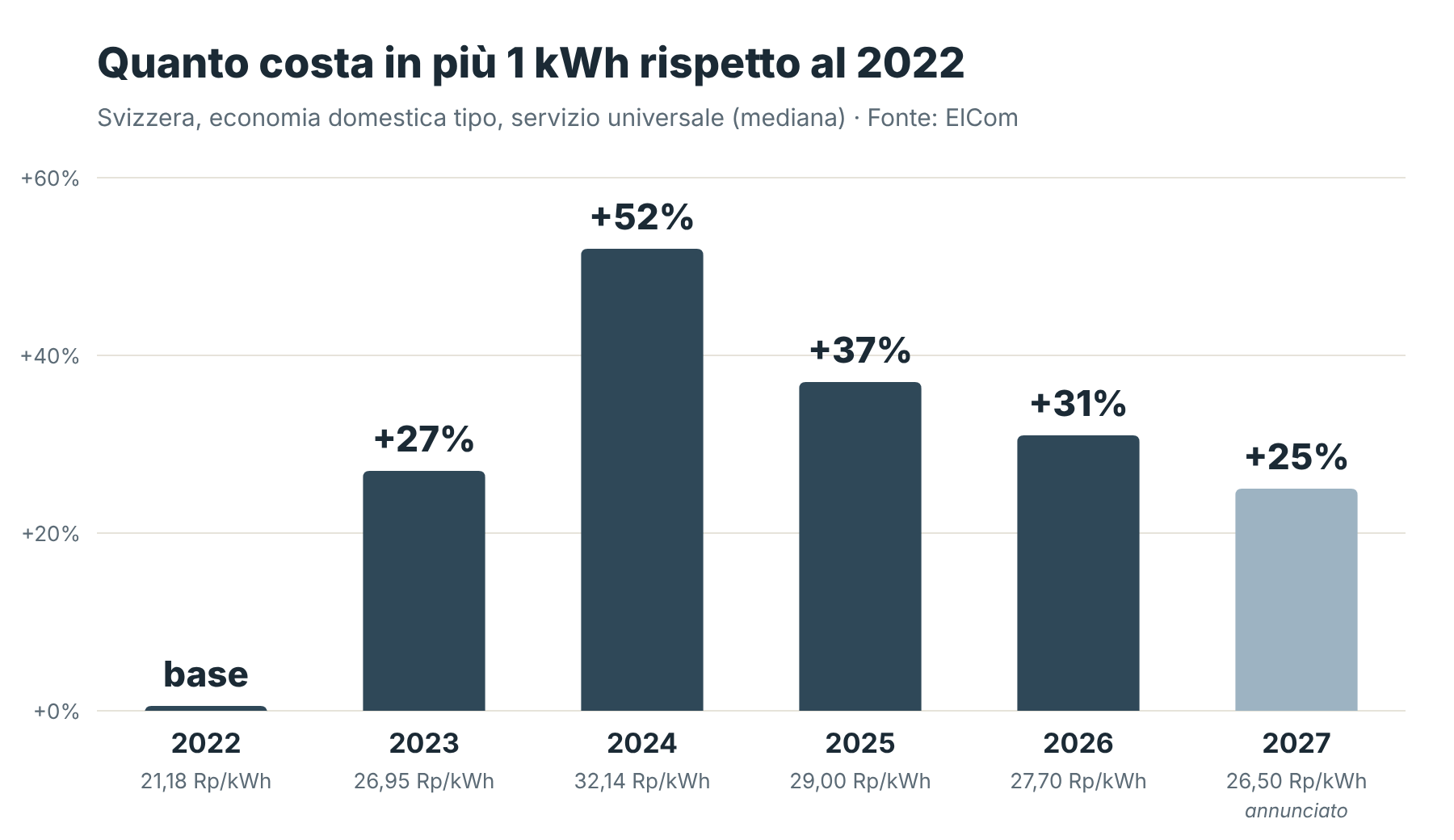
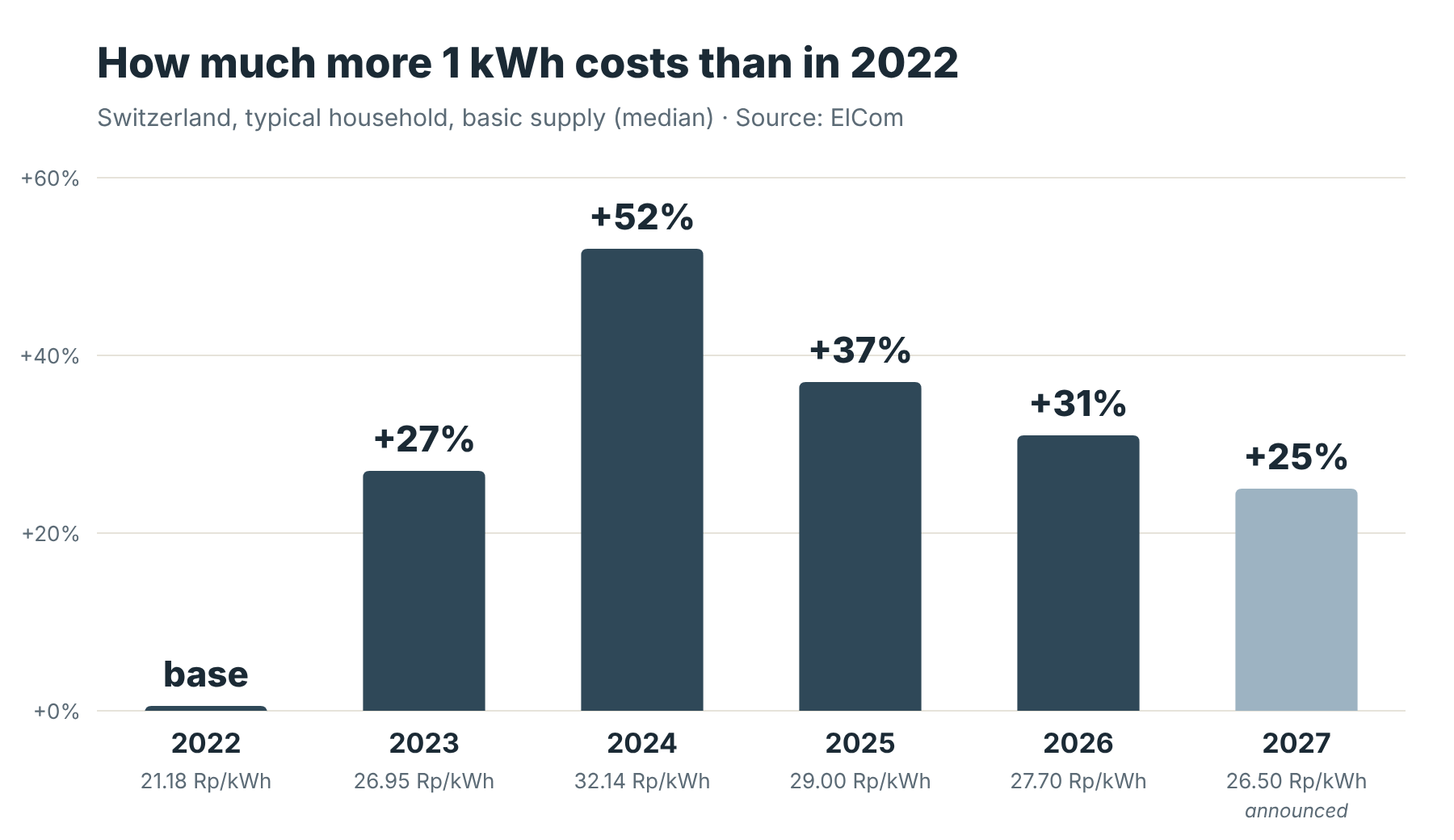
In Switzerland the regulated price of electricity for a typical household rose by 27% in 2023 and by another 18% in 2024. It has been falling slowly since, but the price announced for 2027 is still about a quarter above 2022. For a restaurant, where fryers, griddles, ovens and holding units run all day, every kilowatt-hour wasted now weighs more on the bill.

How much more 1 kWh costs than in 2022, Switzerland 2022-2027

Sources: ElCom / Swiss Federal Council press releases on basic-supply tariffs 2023, 2024, 2025, 2026, 2027. Figures for a typical household (median); the releases do not give a figure for businesses.

Where the energy goes to waste

  • Switched on too early: a fryer turned on an hour before it is needed heats oil for nobody.
  • Left on in quiet hours: between lunch and dinner many units keep running at full power.
  • All at once: when everything is switched on at the same moment, the power peak goes up.
  • Outdoor lights on in broad daylight, or still on long after closing.

Studies of commercial kitchens point the same way: the University of Illinois EnergySense programme estimates that smart use of kitchen equipment alone can save about 7% of energy consumption (source).

How AkroPower helps

📋

Plan once

One card per piece of equipment, one lane per unit. Yellow bars from switch-on to switch-off, heating times and the days each time applies to.

🔔

Remind on time

A notification and an alarm at the exact time of every switch-on and switch-off; on iOS 26 also as system alarms that are hard to miss.

✅

Follow every day

The team simply follows the plan. A PIN keeps it safe; the outdoor section shows where sunset falls each day.

Every franc counts

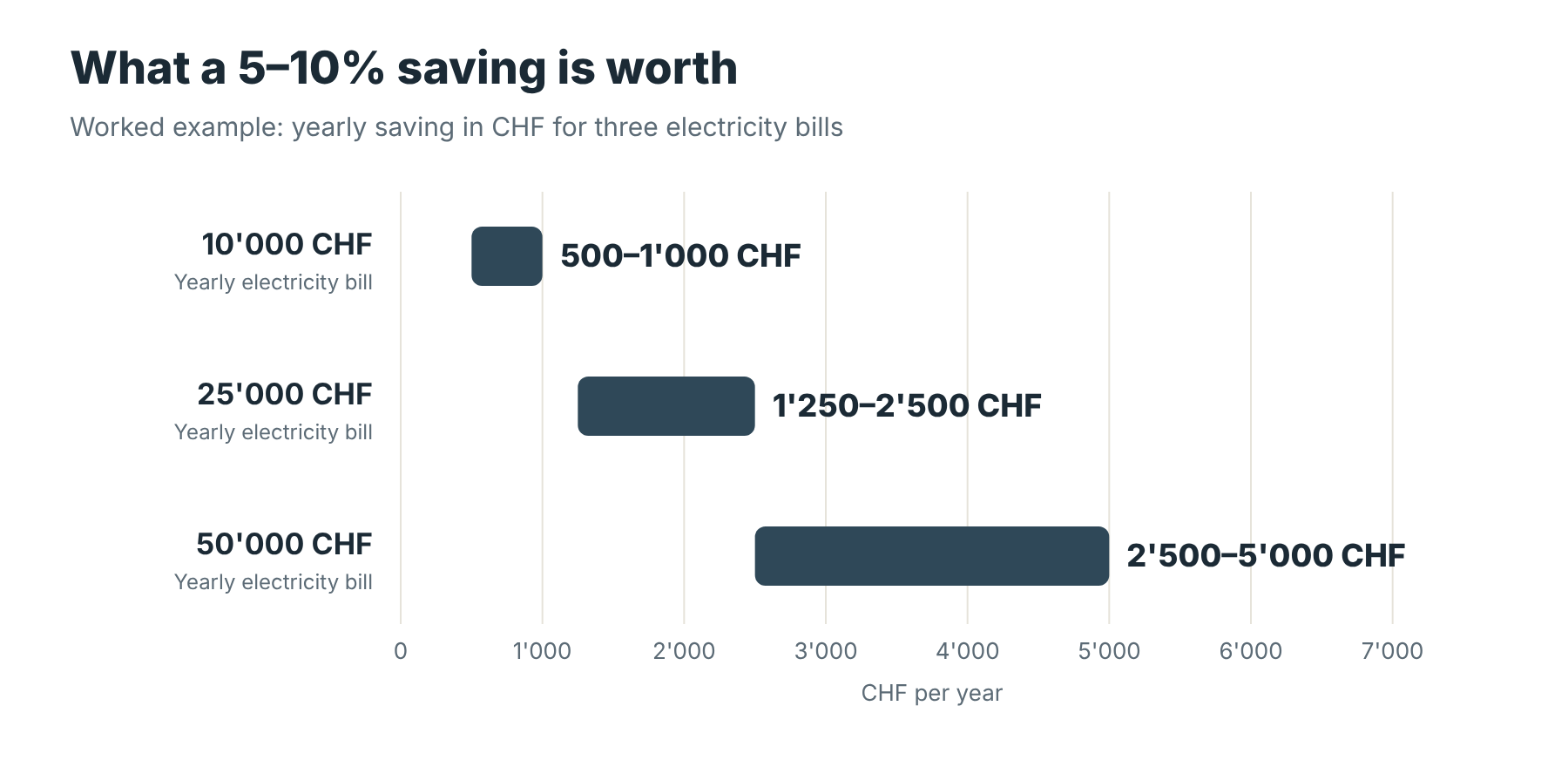
Yearly saving at 5-10% for electricity bills of 10,000, 25,000 and 50,000 CHF

Worked example: the saving is simply 5% and 10% of the yearly bill. It is our operational estimate for quick-service restaurants, not a guarantee: the result depends on the equipment and on how the plan is set and followed.

Free to start, Pro when you need it

Free: view the schedule and change the times on the first lane of each section.
Pro Unlock — one-time payment, no subscription: every lane and section, custom names, copy day, notifications and alarms, alarm sound, PIN lock, your logo and colours, export and import. The price is shown in the app before you buy.

Your data stays yours

No account, no server. The schedule stays on the iPad; a copy of the configuration goes to your own iCloud Drive, to restore it or set up a second iPad the same way. Seven languages: Italian, French, German, English, Spanish, Portuguese and Arabic.

AkroPower is now on the App Store

Free download for iPad and iPhone. Questions? Write to This email address is being protected from spambots. You need JavaScript enabled to view it.

Download on the App Store →

Help and FAQ: Support · Privacy Policy · Terms of Service · This email address is being protected from spambots. You need JavaScript enabled to view it.


ITALIANO

AkroPower — accendi solo quello che serve, quando serve

Il piano di accensioni per le cucine dei ristoranti. Imposti gli orari una volta; ogni giorno l'app dice al team quando accendere e spegnere ogni attrezzatura.

+52%
il prezzo di 1 kWh nel 2024 rispetto al 2022
+25%
ancora nel 2027, dopo i ribassi
5–10%
la nostra stima operativa di elettricità risparmiata
0 CHF
per iniziare: download gratuito

L'elettricità è diventata cara — ed è rimasta cara

In Svizzera il prezzo regolato dell'elettricità per un'economia domestica tipo è salito del 27% nel 2023 e di un altro 18% nel 2024. Da allora scende piano, ma il prezzo annunciato per il 2027 è ancora circa un quarto sopra il 2022. In un ristorante, dove friggitrici, piastre, forni e unità riscaldanti lavorano tutto il giorno, ogni kilowattora sprecato oggi pesa di più sulla bolletta.

Quanto costa in più 1 kWh rispetto al 2022, Svizzera 2022-2027

Fonti: ElCom / Swiss Federal Council press releases on basic-supply tariffs 2023, 2024, 2025, 2026, 2027. Valori per un’economia domestica tipo (mediana); i comunicati non danno una cifra per le aziende.

Dove si spreca l'energia

  • Accensioni troppo anticipate: una friggitrice accesa un'ora prima del necessario scalda l'olio per nessuno.
  • Apparecchi accesi nelle ore morte: fra pranzo e cena molte unità restano a pieno regime.
  • Tutto nello stesso momento: quando si accende tutto insieme, il picco di potenza sale.
  • Luci esterne accese in pieno giorno, o ancora accese molto dopo la chiusura.

Gli studi sulle cucine professionali vanno nella stessa direzione: il programma EnergySense dell'Università dell'Illinois stima che il solo uso intelligente delle attrezzature possa far risparmiare circa il 7% dei consumi (fonte).

Come aiuta AkroPower

📋

Pianifichi una volta

Una scheda per ogni attrezzatura, una linea per ogni unità. Barre gialle dall’accensione allo spegnimento, tempi di riscaldamento e giorni in cui vale ogni orario.

🔔

Ricorda al momento giusto

Notifica e allarme all’ora esatta di ogni accensione e spegnimento; su iOS 26 anche come allarmi di sistema, difficili da ignorare.

✅

Si segue ogni giorno

Il team segue il piano e basta. Un PIN lo protegge; la sezione esterni mostra ogni giorno l’ora del tramonto.

Ogni franco conta

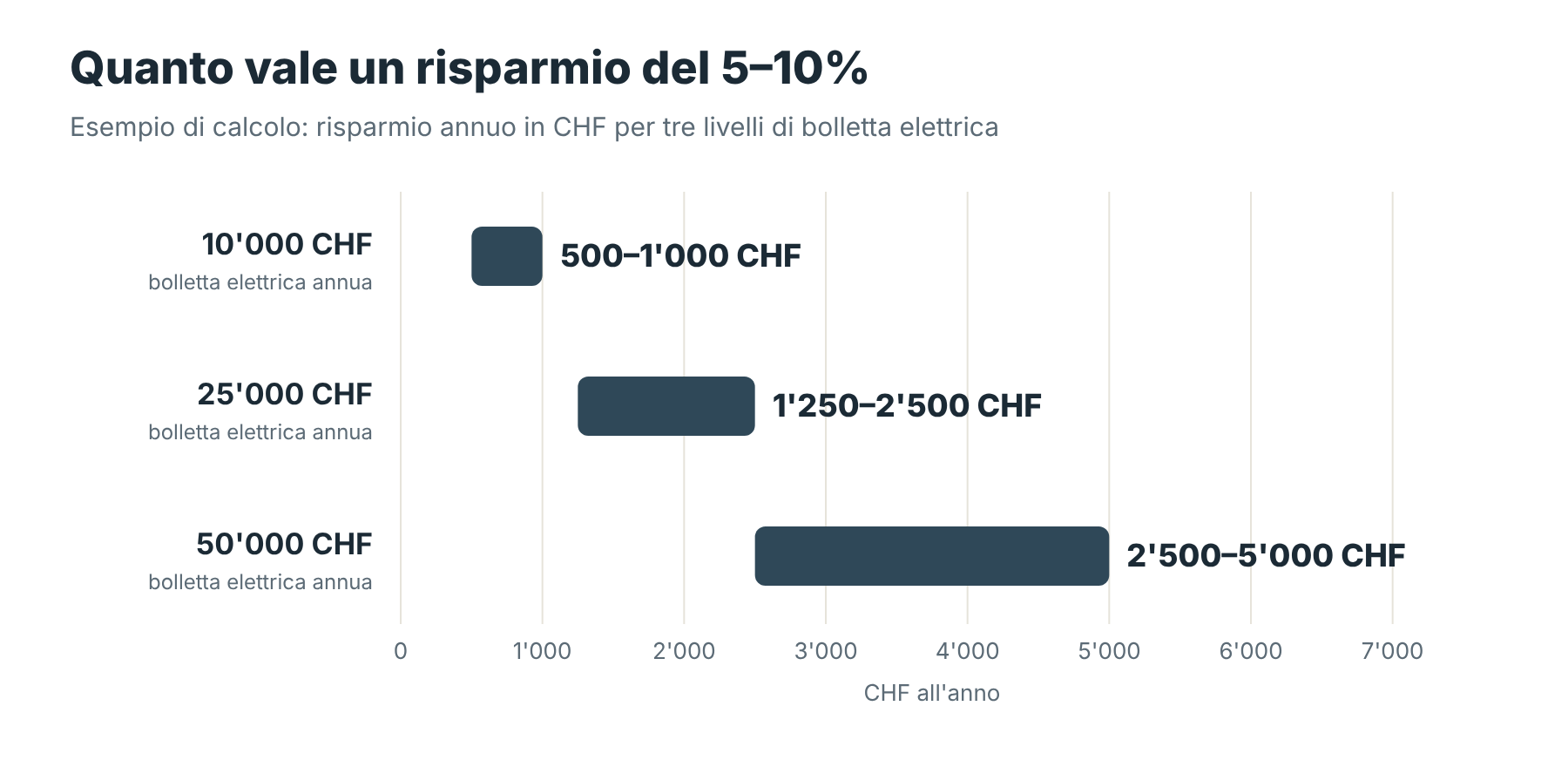
Risparmio annuo al 5-10% per bollette di 10000, 25000 e 50000 CHF

Esempio di calcolo: il risparmio è semplicemente il 5% e il 10% della bolletta annua. È la nostra stima operativa per i ristoranti quick service, non una garanzia: il risultato dipende dalle attrezzature e da come il piano viene impostato e seguito.

Gratis per iniziare, Pro quando serve

Gratis: consulti il programma e modifichi gli orari della prima linea di ogni sezione.
Sblocco Pro — pagamento unico, senza abbonamento: tutte le linee e le sezioni, nomi personalizzati, copia giorno, notifiche e allarmi, suoneria, PIN, logo e colori, esporta e importa. Il prezzo è indicato nell'app prima dell'acquisto.

I tuoi dati restano tuoi

Nessun account, nessun server. Il programma resta sull'iPad; una copia della configurazione va nel tuo iCloud Drive, per ripristinarla o preparare un secondo iPad uguale. Sette lingue: italiano, francese, tedesco, inglese, spagnolo, portoghese e arabo.

AkroPower è disponibile sull’App Store

Download gratuito per iPad e iPhone. Domande? Scrivi a This email address is being protected from spambots. You need JavaScript enabled to view it.

Scarica dall’App Store →

Aiuto e domande frequenti: Support · Privacy Policy · Termini di servizio · This email address is being protected from spambots. You need JavaScript enabled to view it.

Apps

Uncategorised

Akrolitycs LLC · English first · Versione italiana più in basso ↓

ENGLISH

Apps for restaurant teams

Simple iPad and iPhone tools for the daily work of managers and crews. No account, no server: the data stays on the device.

AkroPower
NEWFREE TO START

AkroPower

The switch-on plan for your kitchen

Electricity in Switzerland still costs about 25% more than in 2022. AkroPower tells the team when to switch each fryer, griddle, oven and light on and off, so nothing runs longer than it should.

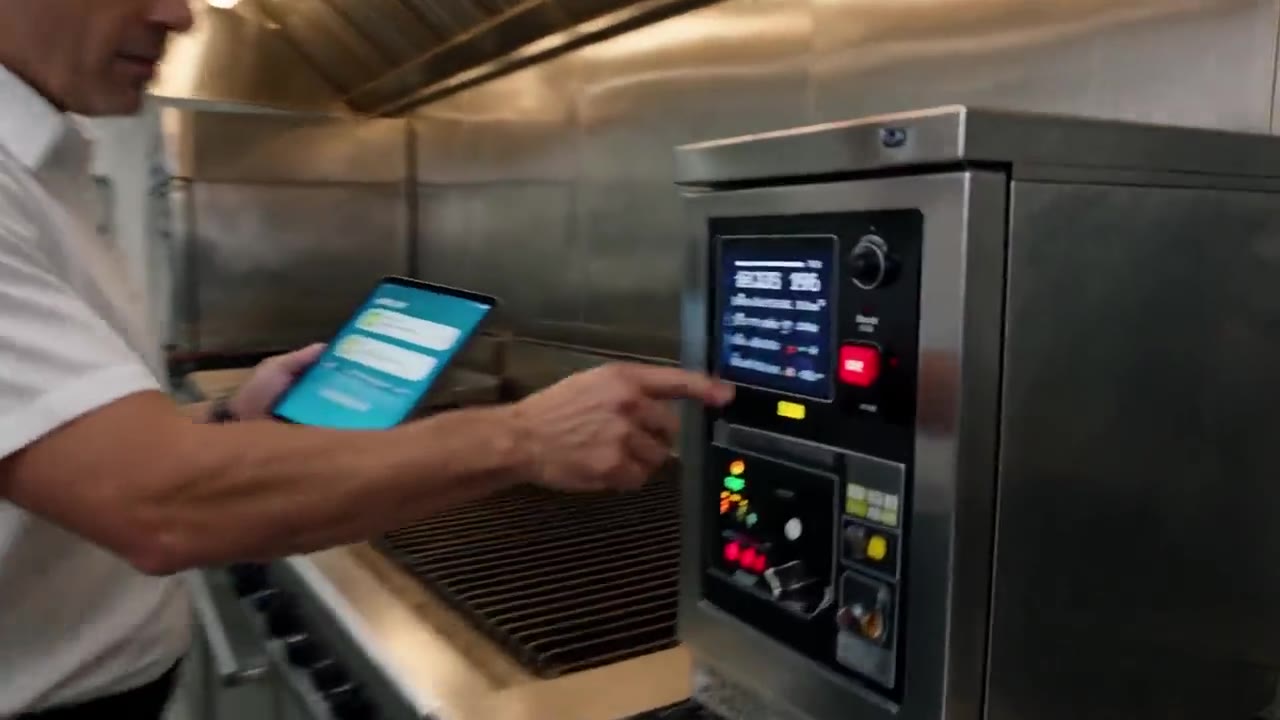
AkroPower▶ Watch the video
+25%
1 kWh in 2027 vs 2022
5–10%
estimated electricity saved
7
languages
  • Plan once, reminders every day
  • Alarms at the exact time, even on silent
  • Free download, one-time Pro unlock
Discover AkroPower → AkroPower on the App Store →
AkroDaily
ON THE APP STORE

AkroDaily

Daily operations for Shift Managers

Scheduled control rounds with QR labels, opening and closing checklists, periodic restaurant evaluations with PDF reports.

  • Control Tour with reminders and QR labels
  • Shift checklists with notes and photos
  • PDF reports ready to share
AkroDaily on the App Store →

Help and FAQ: Support · Privacy Policy · Terms of Service · This email address is being protected from spambots. You need JavaScript enabled to view it.


ITALIANO

App per i team della ristorazione

Strumenti semplici per iPad e iPhone, per il lavoro di ogni giorno di manager e collaboratori. Nessun account, nessun server: i dati restano sul dispositivo.

AkroPower
NOVITÀGRATIS PER INIZIARE

AkroPower

Il piano di accensioni della tua cucina

In Svizzera l'elettricità costa ancora circa il 25% più del 2022. AkroPower dice al team quando accendere e spegnere ogni friggitrice, piastra, forno e luce, così niente resta acceso più del necessario.

AkroPower▶ Guarda il video
+25%
1 kWh nel 2027 rispetto al 2022
5–10%
elettricità risparmiata (stima)
7
lingue
  • Pianifichi una volta, promemoria ogni giorno
  • Allarmi all'ora esatta, anche in silenzioso
  • Download gratuito, sblocco Pro una tantum
Scopri AkroPower → AkroPower sull'App Store →
AkroDaily
SULL'APP STORE

AkroDaily

Le operazioni quotidiane dello Shift Manager

Giri di controllo programmati con etichette QR, checklist di apertura e chiusura, valutazioni periodiche del ristorante con rapporto PDF.

  • Control Tour con promemoria ed etichette QR
  • Checklist di turno con note e foto
  • Rapporti PDF pronti da condividere
AkroDaily sull'App Store →

Aiuto e domande frequenti: Support · Privacy Policy · Terms of Service · This email address is being protected from spambots. You need JavaScript enabled to view it.

Support

Uncategorised

Akrolitycs LLC · support & FAQ
English first · Versione italiana più in basso ↓

ENGLISH

Our apps

AkroDaily is a professional tool for the daily operations of a restaurant, designed for Shift Managers and supervisors.

🕐 Control Tour
Scheduled control rounds of the restaurant zones: scan the QR label of each zone to open its checklist, with automatic reminders at set times and a daily log. Includes printable QR labels.

✅ Shift Check List
Complete opening and closing checklists for each shift, with notes and photos.

🛠️ Restaurant Annual Certification & Check
Periodic restaurant evaluations (6 · 12 · 36 · 60 months) with scoring and PDF report.

AkroPower is the restaurant's energy companion: it turns the equipment switch-on/switch-off schedule into an operational plan the team follows every day, to cut electricity consumption and peak loads.

⚡ Switch-on plan
For every appliance (fryers, griddles, ovens, holding units, coffee machines, outdoor lights, ventilation…) you define its units, switch-on and switch-off times, heat-up times and the days they apply to. The device reminds the team at the right moments, and the plan can be locked with a PIN.

Languages: AkroDaily in Italian, French, German, English and Spanish; AkroPower also in Portuguese and Arabic. All data entered stays on your device.

Frequently asked questions

Where is my data stored?

On your device. Nothing is uploaded to our servers. Deleting an app permanently deletes its data. PDF reports (AkroDaily) and automatic copies of the configuration (AkroPower) are also saved in the app's folder in the Files app and, if iCloud Drive is on, in your own iCloud Drive.

How much does it cost?

AkroDaily: paid download plus a monthly auto-renewable subscription per device (200.00 CHF/month), purchased with the Apple account signed in on that device. It renews automatically unless cancelled at least 24 hours before the end of the period, in Settings → your name → Subscriptions.

AkroPower: free download. You can view the plan and change the times on the first lane of each section for free. The Pro unlock is a one-time payment, no subscription, and opens everything else (editing all lanes and sections, reminders and alarms, PIN, logo and colours, copy day, export/import). The price is shown in the app before you buy.

I already paid but the app asks me again

Tap "Restore purchases" on the purchase screen, using the same Apple ID that made the purchase.

How do I change language?

Use the language selector at the top of the app.

AkroDaily — How do I generate and share a PDF report?

Each module has a "Generate PDF" button at the bottom. The iOS share sheet opens: save to Files, send by email or messaging.

AkroDaily — How do I reset a module?

Each module has its own reset button, with confirmation. Some settings are protected by the PIN chosen on first use.

AkroDaily — How does the Control Tour work?

The app reminds you at scheduled times to run a control round. Tap the alarm (or the scan button), scan the QR label of the zone, answer the checklist and save. Completed zones appear in the daily report, which can be exported as PDF. QR labels for all zones can be generated and printed inside the module.

AkroDaily — How do I attach photos to a checklist point?

Open the note of a point and tap the 📷 button (up to 3 photos per point). Photos are included in the PDF report. The first time, iOS asks permission to use the camera or photo library.

AkroPower — How does the switch-on plan work?

Management sets the schedule once: equipment, units, switch-on/switch-off times, heat-up times and days. From then on the team follows it: the device reminds them when it is time to switch something on or off, so no appliance runs longer than needed and power peaks stay lower.

AkroPower — How do I set up a second iPad the same way?

Use "Export configuration" on the first iPad and "Import configuration" on the second (both with Pro).

AkroPower — How do I send an idea or report a problem?

Tap Ideas in the app: it opens an email to This email address is being protected from spambots. You need JavaScript enabled to view it. with the app name already filled in. You can also write to us directly.

Reminders or alarms don't ring

Check Settings → Notifications → AkroDaily / AkroPower and make sure notifications are allowed. Keep the device volume up ("Ringtone and alerts") and, on iOS 26 or later, allow alarms when the app asks. Reminders are scheduled locally on the device.

Contact us

Write to This email address is being protected from spambots. You need JavaScript enabled to view it. — we reply within 2 business days. Please include the app name, your iOS version and, if possible, a screenshot.

Privacy Policy · Terms of Service


ITALIANO

Le nostre app

AkroDaily è uno strumento professionale per le operazioni quotidiane del ristorante, pensato per Shift Manager e supervisori.

🕐 Control Tour
Giri di controllo programmati delle zone del ristorante: scansiona l'etichetta QR di ogni zona per aprirne la checklist, con promemoria automatici agli orari stabiliti e registro giornaliero. Etichette QR stampabili incluse.

✅ Shift Check List
Checklist complete di apertura e chiusura per ogni turno, con note e foto.

🛠️ Restaurant Annual Certification & Check
Valutazioni periodiche del ristorante (6 · 12 · 36 · 60 mesi) con punteggio e rapporto PDF.

AkroPower è il compagno energetico del ristorante: trasforma il piano di accensioni e spegnimenti delle apparecchiature in una guida operativa che il team segue ogni giorno, per ridurre i consumi elettrici e i picchi di potenza.

⚡ Piano di accensioni
Per ogni apparecchiatura (friggitrici, piastre, forni, unità di mantenimento, macchine del caffè, luci esterne, ventilazione…) definisci unità, orari di accensione e spegnimento, tempi di preriscaldo e giorni in cui valgono. Il dispositivo avvisa il team al momento giusto e il piano si può bloccare con un PIN.

Lingue: AkroDaily in italiano, francese, tedesco, inglese e spagnolo; AkroPower anche in portoghese e arabo. Tutti i dati inseriti restano sul dispositivo.

Domande frequenti

Dove sono salvati i miei dati?

Sul tuo dispositivo. Nulla viene caricato sui nostri server. Eliminando un'app i suoi dati vengono eliminati definitivamente. I rapporti PDF (AkroDaily) e le copie automatiche della configurazione (AkroPower) sono salvati anche nella cartella dell'app nell'app File e, se iCloud Drive è attivo, nel tuo iCloud Drive.

Quanto costa?

AkroDaily: download a pagamento più un abbonamento mensile con rinnovo automatico per dispositivo (200.00 CHF/mese), acquistato con l'account Apple attivo su quel dispositivo. Si rinnova automaticamente salvo disdetta almeno 24 ore prima della fine del periodo, in Impostazioni → il tuo nome → Abbonamenti.

AkroPower: download gratuito. Gratis puoi consultare il piano e modificare gli orari della prima linea di ogni sezione. Lo sblocco Pro è un pagamento una tantum, senza abbonamento, e apre tutto il resto (modifica di tutte le linee e sezioni, promemoria e allarmi, PIN, logo e colori, copia giorno, esporta/importa). Il prezzo è indicato nell'app prima dell'acquisto.

Ho già pagato ma l'app me lo richiede

Tocca "Ripristina acquisti" nella schermata di acquisto, con lo stesso Apple ID che ha effettuato l'acquisto.

Come cambio lingua?

Usa il selettore della lingua in alto nell'app.

AkroDaily — Come genero e condivido un rapporto PDF?

Ogni modulo ha in fondo un pulsante "Genera PDF". Si apre il foglio di condivisione iOS: salva in File, invia per e-mail o messaggio.

AkroDaily — Come azzero un modulo?

Ogni modulo ha il proprio pulsante di azzeramento, con conferma. Alcune impostazioni sono protette dal PIN scelto al primo utilizzo.

AkroDaily — Come funziona il Control Tour?

L'app ti ricorda agli orari stabiliti di effettuare un giro di controllo. Tocca l'allarme (o il pulsante di scansione), scansiona l'etichetta QR della zona, rispondi alla checklist e salva. Le zone completate compaiono nel rapporto giornaliero, esportabile in PDF. Le etichette QR di tutte le zone si generano e stampano dal modulo.

AkroDaily — Come allego foto a un punto della checklist?

Apri la nota di un punto e tocca il pulsante 📷 (fino a 3 foto per punto). Le foto sono incluse nel rapporto PDF. La prima volta iOS chiede il permesso di usare fotocamera o libreria foto.

AkroPower — Come funziona il piano di accensioni?

Il management imposta il piano una volta: apparecchiature, unità, orari di accensione e spegnimento, tempi di preriscaldo e giorni. Da lì il team lo segue: il dispositivo avvisa quando è il momento di accendere o spegnere, così nessuna apparecchiatura resta accesa più del necessario e i picchi di potenza restano più bassi.

AkroPower — Come preparo un secondo iPad uguale?

Usa "Esporta configurazione" sul primo iPad e "Importa configurazione" sul secondo (entrambi con Pro).

AkroPower — Come mando un'idea o segnalo un problema?

Tocca Idee nell'app: si apre una e-mail a This email address is being protected from spambots. You need JavaScript enabled to view it. con il nome dell'app già inserito. Puoi anche scriverci direttamente.

Promemoria o allarmi non suonano

Controlla Impostazioni → Notifiche → AkroDaily / AkroPower e verifica che le notifiche siano consentite. Tieni alto il volume del dispositivo ("Suoneria e avvisi") e, su iOS 26 o successivi, consenti gli allarmi quando l'app lo chiede. I promemoria sono programmati localmente sul dispositivo.

Contattaci

Scrivi a This email address is being protected from spambots. You need JavaScript enabled to view it. — rispondiamo entro 2 giorni lavorativi. Indica il nome dell'app, la versione di iOS e, se possibile, allega uno screenshot.

Privacy Policy · Termini di servizio
  1. Terms of Service
  2. Privacy Policy
  3. Home
Akrolitycs llc
Shams Business Center
Sharjah Media City Free Zone
Al Messaned, Sharjah, UAE
Studio
  • About
  • Services
  • Contact
Contact
  • info@akrolitycs.ae
Legal
  • Privacy Policy
  • Terms of Service
© 2026
All rights reserved.
  • Home
  • ABOUT
  • SERVICES
  • CONTACT
  • Apps